
Check each actor, arrow and branch against the written process, then make sure the same explanation is available in text. W3C's guidance for complex images calls for a short identifying description and a longer text equivalent of the image's essential information.
Pay particular attention to the connections. A box can say “queues approved revision” while an arrow lets work reach it without approval.
What exactly is the diagram supposed to explain?
Establish who acts, what permits the next step and where the process ends. Keep that written source beside the drawing; the diagram's own labels cannot establish whether it is correct.
Here, the task is to explain how an announcement reaches a send queue. The process and deliberately flawed drawing were created for this exercise; they are not a captured AI failure.
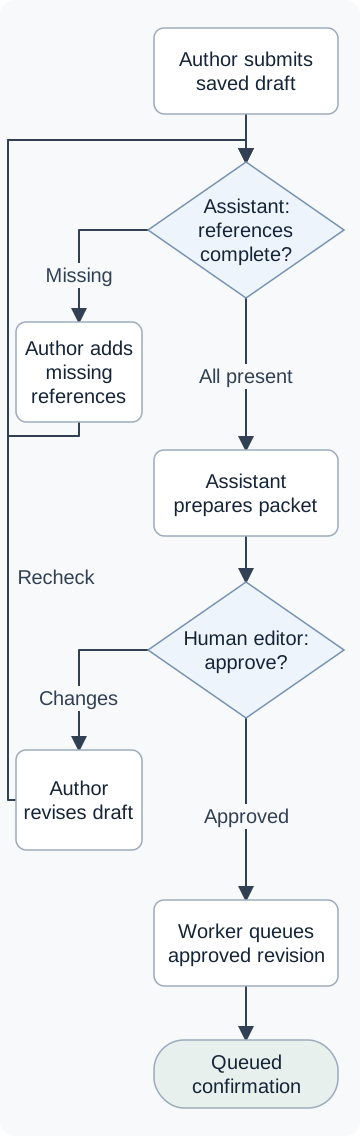
The written source assigns four roles. An author submits a saved draft and its references. An assistant checks reference presence and prepares a packet for a human editor, who approves or requests changes. A separate worker queues the exact approved revision and returns Queued.
Missing references go back to the author for repair and another check. Requested edits also return through checking and a new packet before another editorial decision. The assistant's presence check does not establish that the sources support the claims.
If your source leaves the decision owner undefined, resolve that first. The workflow-design guide covers those responsibilities.
Which errors can hide in a diagram that looks plausible?
Look for a connection that permits something the source forbids, as well as reversed arrows, the wrong decision owner and missing branches. A drawing can contain all the expected boxes and still describe the wrong process.
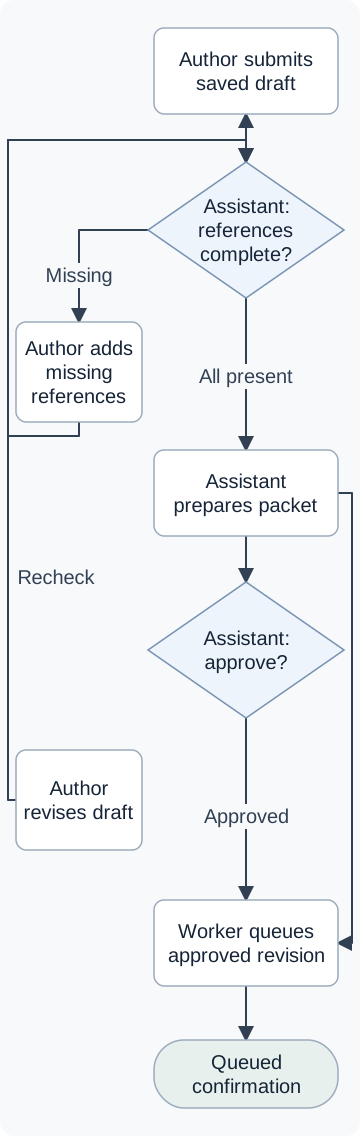
These are route fragments from the exercise. The flawed drawing has a path through an approval decision and an extra direct route from packet preparation to queuing.
- Connection: Packet to queue
Flawed route
Assistant prepares packet → Worker queues approved revision.
This extra arrow reaches the worker without passing through approval. Preparing the packet is enough to take this route.
Corrected route
Packet → human editor → approval of this revision → worker queues that revision → Queued.
Remove the shortcut. The source permits queuing only after the human editor accepts that exact revision.
Calling the destination “approved” does not supply the skipped decision. The unsupported claim is in the connection between two otherwise legitimate steps.
The full drawing has three other faults:
- Direction: the arrow points from reference checking back to submission. Reverse it: submission starts the check.
- Actor: the approval diamond names the assistant. It must name the human editor.
- Missing branch: nothing connects a change request to the author's revision step. Restore Changes → author revises, keeping the existing return from revision to reference checking.
Check what borders and branching layouts imply too. This exercise defines no ownership lanes or parallel work; its shared return line simply takes two repair paths to the same check. The complete relationship audit records the full graph, including the relationships that stay unchanged.
What does a successful render actually tell me?
It tells you the drawing definition produced an image. It does not compare that drawing with the written process.
Both SVGs in this exercise were converted successfully to PNG, including the flawed version with its shortcut intact. Connecting two existing boxes produced a drawable line. The rendering tool had no reason to object to the permission that line invented.
Can someone understand the process without seeing the diagram?
Yes, when the text gives them the actors, decisions, return paths and stopping point. “Announcement workflow” names the subject but leaves the process unexplained.
Here is the complete corrected route in words:
The author submits a saved draft and its source references to the assistant. If any factual claim lacks a reference, the assistant identifies the gap and returns the draft to the author. The author supplies the missing references; the assistant checks again. Only when all references are present does it prepare a packet containing that exact revision and its references.
The human editor reads the packet and decides. If changes are needed, the author revises and submits the new revision to the assistant's reference check. It must pass that check, enter a new packet and reach the human editor for another decision.
If the editor approves, the separate worker queues the revision named in that approval. It cannot substitute a newer, unreviewed draft. The worker returns Queued for that revision. Sending, delivery, recipient response and queue failures are outside this process.
Keep the distinction between a present reference and a supporting source; the claim-checking guide explains the latter. The assistant's first check has a narrower job.
A text description of a flawed diagram must preserve its mistakes, so the reader can inspect the same example. Above, the flawed fragment explicitly retains the shortcut. The full flawed drawing has a matching visual transcription; the corrected drawing has its own complete explanation.
Can a reader follow the corrected diagram on the article page?
Keep the approval condition attached to the action it permits when the page narrows or the layout changes. The comparison here shows a route fragment; the full drawings are linked separately.
In the corrected row, approval of this revision leads to worker queues that revision, with the reason directly below. Check that both phrases and the explanation remain readable together at desktop and narrow widths. If the page leaves only “worker queues” visible, it has lost the condition this example is meant to explain.
The return route matters for the same reason: an editor's request for changes sends the new revision through checking and review again. An arrow from revision straight to the worker would grant approval the new draft has never received.
Keep reading
Related guides.
Fact-check AI-generated content one claim at a time
Check an AI-written claim against its source, work through a hypothetical example, and decide what to keep, qualify, remove, or send for specialist review.
Read the guideHow to build an AI agent workflow: start with the problem
Design an AI agent workflow around a useful result. Follow one article-preparation example through inputs, dependencies, review, recovery, and a clear stopping point.
Read the guide